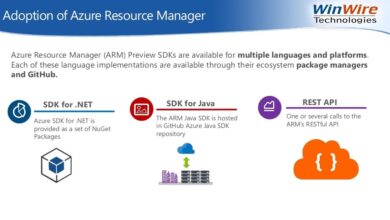
If you’re exploring cloud computing, Microsoft Azure stands out as a dominant force—powerful, flexible, and trusted by enterprises worldwide. Let’s dive into why it’s a game-changer.
What Is Microsoft Azure and Why It Matters

Microsoft Azure is a comprehensive cloud computing platform developed by Microsoft, offering over 200 services ranging from virtual machines and databases to AI and IoT solutions. Launched in 2010 as Windows Azure, it has evolved into one of the top three cloud platforms globally, competing directly with Amazon Web Services (AWS) and Google Cloud Platform (GCP). Its hybrid capabilities, enterprise integration, and global reach make it a preferred choice for businesses of all sizes.



Origins and Evolution of Microsoft Azure
Azure began as a platform for hosting .NET applications but quickly expanded to support multiple programming languages, frameworks, and tools. In 2014, Microsoft rebranded it from Windows Azure to Microsoft Azure, signaling its shift from a Windows-centric platform to a multi-platform, open-source-friendly cloud environment. This strategic pivot allowed Azure to embrace Linux, open APIs, and cross-platform development, broadening its appeal.
The evolution didn’t stop there. Microsoft invested heavily in data centers, acquiring over 60 cloud regions worldwide—more than any other cloud provider. This global footprint enables low-latency access and compliance with regional data laws, a critical factor for multinational corporations. According to Microsoft’s official site, Azure operates in 140+ countries, supporting diverse regulatory standards like GDPR, HIPAA, and ISO certifications.
- Originally launched as Windows Azure in February 2010
- Rebranded to Microsoft Azure in 2014 to reflect broader capabilities
- Now supports hybrid cloud, multi-cloud, and edge computing models
Core Services Offered by Microsoft Azure
Azure provides a vast array of services categorized into computing, networking, storage, databases, analytics, AI, and security. Key offerings include Azure Virtual Machines for scalable compute power, Azure Blob Storage for unstructured data, and Azure SQL Database for managed relational databases. It also features advanced tools like Azure Kubernetes Service (AKS) for container orchestration and Azure Functions for serverless computing.
One of Azure’s standout features is its seamless integration with Microsoft 365, Dynamics 365, and Active Directory. This tight ecosystem allows organizations already using Microsoft products to transition smoothly to the cloud without overhauling their existing infrastructure. For developers, Azure DevOps provides end-to-end tools for CI/CD pipelines, version control, and agile project management.
“Microsoft Azure isn’t just about infrastructure; it’s about enabling innovation through intelligent cloud and intelligent edge.” — Satya Nadella, CEO of Microsoft
Microsoft Azure vs. AWS vs. Google Cloud: A Comparative Analysis
When choosing a cloud provider, businesses often compare Microsoft Azure, Amazon Web Services (AWS), and Google Cloud Platform (GCP). Each has strengths, but Azure excels in specific areas, particularly for enterprises already embedded in the Microsoft ecosystem. Understanding the differences helps organizations make informed decisions based on cost, performance, integration, and support.
Market Share and Global Reach
As of 2024, AWS leads the cloud market with approximately 32% share, followed by Microsoft Azure at around 23%, and Google Cloud at 10%, according to Synergy Research Group. While AWS has a first-mover advantage, Azure’s growth rate has been the fastest among the three, driven by strong enterprise adoption and hybrid cloud demand.
Azure’s global presence is a major differentiator. With 60+ physical regions, Azure offers more geographic availability than AWS (33 regions) and GCP (35 regions). This extensive reach benefits companies requiring data residency compliance or low-latency services in emerging markets. For example, Azure has data centers in South Africa, UAE, and India—regions where competitors have limited or no presence.
- Azure: 60+ regions, 140+ countries
- AWS: 33 regions, 100+ availability zones
- GCP: 35 regions, 106 zones
Integration with Enterprise Systems
Where Azure truly shines is in its integration with existing enterprise environments. Organizations using Microsoft Office 365, Active Directory, or Windows Server find Azure a natural extension of their IT infrastructure. Features like Azure Active Directory (now Microsoft Entra ID) enable single sign-on (SSO), multi-factor authentication, and identity governance across cloud and on-premises systems.
In contrast, AWS and GCP require additional configuration or third-party tools to achieve similar levels of integration. For instance, integrating AWS with Microsoft AD often involves setting up AWS Directory Service or leveraging external identity providers. Azure simplifies this with native tools, reducing complexity and operational overhead.
Additionally, Azure’s hybrid cloud solutions—such as Azure Stack and Azure Arc—allow businesses to run Azure services on-premises or in multi-cloud environments. This flexibility is crucial for industries like finance and healthcare, where regulatory requirements mandate data sovereignty.
Key Benefits of Using Microsoft Azure
Organizations adopt Microsoft Azure for a variety of compelling reasons, from scalability and cost-efficiency to advanced security and AI capabilities. These benefits are not just theoretical—they translate into real-world improvements in agility, innovation, and operational efficiency.
Scalability and Flexibility
One of the core advantages of Microsoft Azure is its ability to scale resources up or down based on demand. Whether you’re running a small web application or a large-scale enterprise system, Azure automatically adjusts compute, storage, and networking resources. This elasticity ensures optimal performance during traffic spikes while minimizing costs during low-usage periods.
Azure’s pay-as-you-go pricing model means businesses only pay for what they use. Unlike traditional on-premises infrastructure, which requires large upfront investments, Azure allows organizations to start small and grow as needed. This is particularly beneficial for startups and SMEs looking to innovate without heavy capital expenditure.
- Auto-scaling for virtual machines and apps
- Support for burstable VMs to handle variable workloads
- Global load balancing via Azure Traffic Manager
Cost Management and Pricing Models
Microsoft Azure offers several pricing models to suit different needs: pay-as-you-go, reserved instances, and hybrid benefit discounts. The Azure Hybrid Benefit allows customers with existing Windows Server or SQL Server licenses to apply them in the cloud, reducing costs by up to 40%. This is a significant advantage for enterprises already invested in Microsoft licensing.
The Azure Pricing Calculator and Total Cost of Ownership (TCO) tool help organizations estimate and optimize their cloud spending. Additionally, Azure Cost Management + Billing provides real-time insights into usage patterns, budget alerts, and recommendations for cost savings. These tools empower IT teams to maintain financial control while maximizing resource utilization.
Learn more about Azure pricing at Microsoft Azure Pricing.
Microsoft Azure Security and Compliance Features
Security is a top priority for any cloud platform, and Microsoft Azure delivers robust protections across physical, network, and application layers. With over $1 billion invested annually in cybersecurity, Microsoft ensures that Azure meets the highest standards for data protection and regulatory compliance.
Built-in Security Tools and Identity Management
Azure offers a suite of security services under Microsoft Defender for Cloud (formerly Azure Security Center). This unified platform provides threat detection, vulnerability assessment, and security posture management across hybrid and multi-cloud environments. It continuously monitors resources and provides actionable recommendations to improve security.
Identity management is handled through Microsoft Entra ID (formerly Azure Active Directory), which supports conditional access policies, multi-factor authentication (MFA), and identity protection. These features help prevent unauthorized access and mitigate risks from compromised credentials. For example, if a login attempt originates from an unusual location or device, Entra ID can require additional verification steps.
- Microsoft Defender for Cloud: Unified security management
- Microsoft Entra ID: Identity and access control
- Azure Firewall: Managed network security service
Compliance and Data Protection Standards
Microsoft Azure complies with over 140 international and industry-specific standards, including GDPR, HIPAA, SOC 1/2/3, ISO 27001, and FedRAMP. This makes it suitable for highly regulated sectors such as finance, healthcare, and government.
Data encryption is enabled by default, both at rest and in transit. Azure uses industry-standard protocols like TLS 1.2+ for data in motion and AES-256 for data at rest. Customers can also manage their own encryption keys using Azure Key Vault, giving them full control over cryptographic operations.
For data residency, Azure allows organizations to specify where their data is stored and processed. This is critical for compliance with laws like the EU’s GDPR or China’s Cybersecurity Law. Microsoft publishes a detailed Compliance Manager dashboard that helps customers assess and manage their regulatory obligations.
Microsoft Azure for Developers and DevOps
Developers play a crucial role in cloud adoption, and Microsoft Azure provides a rich set of tools and platforms to streamline development, testing, and deployment. From integrated development environments to automated pipelines, Azure empowers teams to build and deliver software faster and more reliably.
Azure DevOps and CI/CD Pipelines
Azure DevOps is a comprehensive suite that includes Azure Repos (Git repositories), Azure Boards (agile planning), Azure Pipelines (CI/CD), Azure Test Plans, and Azure Artifacts (package management). Teams can automate builds, run tests, and deploy applications to any environment—on Azure, AWS, GCP, or on-premises.
Azure Pipelines supports over 30 job environments, including Windows, Linux, and macOS. It integrates seamlessly with GitHub, allowing developers to trigger deployments directly from pull requests. This integration fosters collaboration between teams using different platforms while maintaining consistency in delivery processes.
- Automated builds and deployments
- Integration with GitHub and third-party tools
- Support for multi-cloud and hybrid deployments
Serverless Computing with Azure Functions
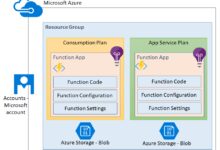
Azure Functions enables serverless computing, allowing developers to run code in response to events without managing infrastructure. This model is ideal for microservices, background tasks, and event-driven architectures. Functions can be triggered by HTTP requests, timers, database changes, or messages from Azure Service Bus.
Pricing is based on execution time and the number of executions, making it cost-effective for sporadic workloads. A free tier is available, allowing developers to experiment without incurring costs. Functions support multiple languages, including C#, JavaScript, Python, Java, and PowerShell, ensuring broad developer accessibility.
“Serverless doesn’t mean no servers—it means you don’t manage them.” — Microsoft Azure Documentation
Artificial Intelligence and Machine Learning on Microsoft Azure
Microsoft Azure has emerged as a leader in democratizing AI and machine learning for businesses. Through accessible tools and pre-built models, Azure enables organizations to integrate intelligent capabilities into their applications without requiring deep expertise in data science.
Azure Cognitive Services and AI APIs
Azure Cognitive Services provide ready-to-use APIs for vision, speech, language, and decision-making. For example, the Computer Vision API can analyze images to detect objects, read text (OCR), or identify faces. The Text Analytics API performs sentiment analysis, key phrase extraction, and language detection.
These services can be integrated into applications with just a few lines of code. A retail app could use the Face API to personalize customer experiences, while a customer support chatbot could leverage the Language Understanding (LUIS) service to interpret user intent.
- Computer Vision: Image analysis and object detection
- Speech Services: Speech-to-text and text-to-speech conversion
- Language Service: Sentiment analysis and entity recognition
Machine Learning with Azure Machine Learning Studio
Azure Machine Learning is a cloud-based environment for training, deploying, and managing ML models. It supports both code-first workflows (using Python and Jupyter notebooks) and no-code/low-code interfaces via drag-and-drop modules in Azure ML Studio.
Data scientists can use automated ML (AutoML) to test multiple algorithms and hyperparameters, identifying the best model for a given dataset. Once trained, models can be deployed as web services accessible via REST APIs. Integration with Azure Databricks and Synapse Analytics enables large-scale data processing and real-time analytics.
Microsoft also offers AI accelerators and industry-specific solutions, such as the Azure AI Health Bot for healthcare providers or the Fraud Detection solution for financial institutions.
Hybrid and Multi-Cloud Capabilities of Microsoft Azure
In today’s complex IT landscape, few organizations rely solely on a single cloud. Many adopt hybrid or multi-cloud strategies to balance performance, cost, and compliance. Microsoft Azure is uniquely positioned to support these architectures through innovative solutions like Azure Arc and Azure Stack.
Azure Arc: Managing Resources Across Environments
Azure Arc extends Azure’s management capabilities to servers, Kubernetes clusters, and data services running on-premises, in edge locations, or on other clouds. This means you can apply Azure policies, monitor performance, and deploy updates consistently across all environments from a single control plane.
For example, a company using AWS EC2 instances can connect them to Azure Arc and manage them using Azure Policy and Azure Monitor. This unified governance reduces complexity and enhances security, especially in distributed environments.
- Centralized management of multi-cloud and on-prem resources
- Consistent policy enforcement and security posture
- Seamless integration with Azure services like Log Analytics and Automation
Azure Stack: Bringing Azure to On-Premises
Azure Stack is a family of products that brings Azure services into on-premises data centers. Azure Stack Hub allows organizations to run Azure IaaS and PaaS services locally, while Azure Stack Edge provides edge computing with AI capabilities.
This is particularly valuable for industries with strict data sovereignty requirements, such as defense or banking. It also supports scenarios where internet connectivity is unreliable, enabling local processing with periodic synchronization to the public cloud.
Applications developed on Azure can be deployed on Azure Stack with minimal changes, ensuring consistency across environments. This portability accelerates development and reduces vendor lock-in concerns.
Explore Azure Arc capabilities at Azure Arc Official Page.
What is Microsoft Azure used for?
Microsoft Azure is used for a wide range of purposes, including hosting virtual machines, running web applications, storing data, implementing AI and machine learning models, managing containers, and enabling hybrid cloud environments. It’s also widely used for enterprise integration, especially with Microsoft 365 and Active Directory.
How does Microsoft Azure compare to AWS?
While AWS has a larger market share and more services, Microsoft Azure excels in enterprise integration, hybrid cloud capabilities, and Microsoft ecosystem compatibility. Azure is often preferred by organizations already using Microsoft products due to seamless connectivity and licensing benefits.
Is Microsoft Azure secure?
Yes, Microsoft Azure is highly secure, offering built-in tools like Microsoft Defender for Cloud, Microsoft Entra ID, and Azure Firewall. It complies with over 140 regulatory standards and uses advanced encryption for data at rest and in transit.
Can I use Azure for machine learning?
Absolutely. Azure provides powerful tools like Azure Machine Learning Studio, Cognitive Services, and AI APIs that make it easy to build, train, and deploy machine learning models, even for users with limited data science experience.
What is Azure’s pricing model?
Azure uses a pay-as-you-go model, where you only pay for the resources you consume. It also offers reserved instances for long-term savings and the Azure Hybrid Benefit, which allows you to use existing Windows Server and SQL Server licenses to reduce costs.
Microsoft Azure has firmly established itself as a leading cloud platform by combining enterprise-grade reliability with cutting-edge innovation. From its deep integration with Microsoft products to its robust security, AI capabilities, and hybrid cloud leadership, Azure offers a compelling solution for modern businesses. Whether you’re a developer, IT administrator, or business leader, understanding and leveraging Microsoft Azure can drive digital transformation, reduce costs, and accelerate innovation. As cloud adoption continues to grow, Azure remains a powerful ally in navigating the future of technology.
Further Reading: