Welcome to the world of Azure Cloud—where innovation meets scalability. Whether you’re a startup or a global enterprise, Microsoft’s cloud platform offers powerful tools to transform your digital landscape with unmatched reliability and security.
What Is Azure Cloud and Why It Matters

Azure Cloud, officially known as Microsoft Azure, is one of the leading public cloud computing platforms in the world. Launched in 2010, it has rapidly evolved into a comprehensive ecosystem offering over 200 services, including computing, storage, networking, databases, AI, and IoT. Unlike traditional on-premise infrastructure, Azure Cloud enables organizations to scale resources on demand, reduce capital expenditure, and accelerate time-to-market for new applications.


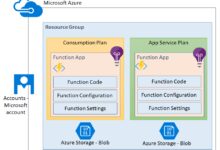
Core Components of Azure Cloud
Azure Cloud is built on a global network of data centers managed by Microsoft. These components form the backbone of its service offerings:
- Compute: Virtual machines, Azure Functions, and Kubernetes Services (AKS) allow flexible deployment of applications.
- Storage: Blob, File, Queue, and Table storage provide scalable and durable options for data.
- Networking: Virtual networks, load balancers, and Azure DNS ensure secure and efficient connectivity.
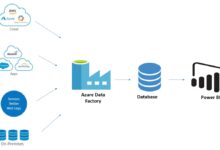
- Databases: Azure SQL Database, Cosmos DB, and MySQL/PostgreSQL flexible servers support diverse data needs.
These services are accessible via a web-based portal, command-line tools, or programmatically through APIs, making Azure Cloud highly adaptable for developers and IT professionals alike.
How Azure Cloud Compares to AWS and Google Cloud
While Amazon Web Services (AWS) was first to market, Azure Cloud has gained significant traction by leveraging Microsoft’s enterprise relationships and hybrid cloud strengths. According to Gartner’s 2023 Magic Quadrant for Cloud Infrastructure, Azure ranks second in market share but leads in hybrid integration and Windows-based workloads.
“Azure’s tight integration with Active Directory, Office 365, and Windows Server makes it the preferred choice for enterprises already invested in Microsoft technologies.” — Gartner Research
Google Cloud, while strong in data analytics and AI, lacks Azure’s breadth in enterprise support and hybrid capabilities. This positions Azure Cloud as the most balanced option for organizations seeking seamless integration between on-premises and cloud environments.
Azure Cloud Architecture: Understanding the Foundation
The architecture of Azure Cloud is designed for high availability, fault tolerance, and global reach. It operates across more than 60 regions worldwide, allowing businesses to deploy applications close to their users for reduced latency and compliance with data sovereignty laws.
Regions, Availability Zones, and Resource Groups
Azure Cloud divides its infrastructure into geographic regions, each containing one or more data centers. Within these regions, Availability Zones are physically separate locations that protect against data center failures. By deploying applications across multiple zones, businesses can achieve up to 99.99% uptime SLA.
Additionally, Resource Groups act as logical containers that help organize and manage related resources—such as VMs, databases, and networks—under a single lifecycle and access policy. This simplifies governance and cost tracking.
The Role of Azure Resource Manager (ARM)
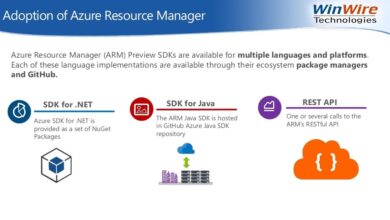
Azure Resource Manager (ARM) is the deployment and management engine at the heart of Azure Cloud. It allows users to create, update, and delete resources using templates (JSON-based ARM templates), enabling Infrastructure as Code (IaC) practices.
- Declarative syntax for defining infrastructure.
- Supports version control and repeatable deployments.
- Enables role-based access control (RBAC) and policy enforcement.
With ARM, teams can automate complex environments, reduce configuration drift, and ensure compliance across thousands of resources.
Top 7 Powerful Benefits of Using Azure Cloud
Choosing the right cloud provider is a strategic decision. Azure Cloud stands out due to its robust feature set and enterprise-grade capabilities. Here are seven powerful reasons why organizations are migrating to Azure Cloud.
1. Seamless Hybrid Cloud Integration
One of Azure Cloud’s most powerful advantages is its hybrid cloud capability. Through services like Azure Arc and Azure Stack, businesses can manage on-premises servers, edge devices, and multi-cloud environments from a single control plane.
- Extend Azure services to local data centers.
- Consistent security policies across environments.
- Unified monitoring with Azure Monitor.
This hybrid approach is ideal for regulated industries like finance and healthcare, where data residency requirements limit full cloud migration.
2. Enterprise-Grade Security and Compliance
Security is not an afterthought in Azure Cloud—it’s built-in. Microsoft invests over $1 billion annually in cybersecurity research and employs more than 3,500 security experts.
- Built-in DDoS protection and encryption at rest and in transit.
- Advanced Threat Protection for SQL, storage, and VMs.
- Compliance with over 140 standards, including GDPR, HIPAA, ISO 27001, and FedRAMP.
Azure Cloud also integrates with Microsoft Defender for Cloud, providing unified security management and advanced threat detection across hybrid workloads.
3. AI and Machine Learning at Scale
Azure Cloud offers one of the most accessible AI platforms in the industry. With Azure AI Services, developers can integrate vision, speech, language, and decision models into applications without deep machine learning expertise.
- Pre-built APIs for facial recognition, text analytics, and translation.
- Custom models via Azure Machine Learning Studio.
- Responsible AI tools to assess fairness, interpretability, and privacy.
For example, companies like BMW use Azure Cognitive Services to enhance customer experiences through voice-enabled assistants and image recognition in manufacturing.
4. Cost Efficiency and Flexible Pricing Models
Azure Cloud provides multiple pricing models to optimize costs, including pay-as-you-go, reserved instances, and spot pricing for non-critical workloads.
- Cost Management + Billing tools offer real-time spending insights.
- Reserved VM Instances can save up to 72% compared to pay-as-you-go.
- Hybrid Benefit allows customers to use existing Windows Server licenses for up to 40% savings.
Additionally, the Azure Pricing Calculator helps estimate costs before deployment, reducing financial surprises.
5. Global Reach and High Availability
With presence in 60+ regions, Azure Cloud offers the broadest global footprint among major cloud providers. This enables low-latency access for users worldwide and supports disaster recovery strategies.
- Content Delivery Network (CDN) accelerates web content delivery.
- Geo-redundant storage replicates data across regions.
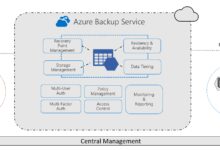
- Disaster recovery with Azure Site Recovery ensures business continuity.
For multinational corporations, this global infrastructure reduces dependency on third-party CDNs and improves user experience.
6. Developer-Friendly Ecosystem
Azure Cloud supports a wide range of programming languages, frameworks, and DevOps tools. Whether you’re using .NET, Java, Node.js, Python, or Go, Azure provides SDKs and integrations to streamline development.
- GitHub integration with Azure Pipelines for CI/CD.
- Visual Studio and VS Code extensions for cloud debugging.
- Open-source friendly with support for Kubernetes, Terraform, and Ansible.
Microsoft’s acquisition of GitHub has further strengthened this ecosystem, enabling seamless collaboration between developers and operations teams.
7. Sustainability and Environmental Responsibility
Azure Cloud is committed to sustainability, with Microsoft pledging to be carbon negative by 2030 and remove all historical emissions by 2050.
- Data centers powered by renewable energy (60% as of 2023).
- Water-cooled servers and AI-driven cooling optimization.
- Azure Sustainability Calculator helps customers measure their carbon footprint.
This focus on green computing not only supports corporate ESG goals but also reduces long-term operational risks associated with climate change.
Azure Cloud Services: A Deep Dive into Key Offerings
Beyond the core infrastructure, Azure Cloud provides specialized services that cater to modern application development, data analytics, and digital transformation.
Compute Services: VMs, Containers, and Serverless
Azure Cloud offers a full spectrum of compute options:
- Virtual Machines (VMs): Scalable IaaS with support for Linux and Windows.
- Azure Kubernetes Service (AKS): Managed Kubernetes for container orchestration.
- Azure Functions: Event-driven serverless computing for microservices.
AKS, in particular, simplifies cluster management and integrates with Helm, Istio, and Prometheus for observability. It’s widely used for deploying microservices architectures at scale.
Storage and Data Management Solutions
Data is the lifeblood of modern applications, and Azure Cloud provides durable, scalable, and secure storage options.
- Azure Blob Storage: Ideal for unstructured data like images, videos, and backups.
- Azure Files: Fully managed file shares accessible via SMB/NFS.
- Azure Data Lake: Petabyte-scale analytics platform for big data.
For relational data, Azure SQL Database offers intelligent, self-tuning performance with built-in high availability and automated backups.
Networking and Connectivity Features
Azure Cloud ensures secure and reliable connectivity through advanced networking services:
- Azure Virtual Network (VNet): Isolated network environment for your resources.
- Azure ExpressRoute: Private connection from on-premises to Azure, bypassing the public internet.
- Azure Firewall: Managed, cloud-native firewall with threat intelligence.
ExpressRoute is especially valuable for enterprises requiring consistent bandwidth and lower latency for mission-critical applications.
How to Get Started with Azure Cloud
Starting with Azure Cloud doesn’t require a massive upfront investment. Microsoft offers several pathways for exploration and deployment.
Creating an Azure Account and Free Tier Access
Anyone can sign up for a free Azure account at azure.microsoft.com/free. The free tier includes:
- $200 in credits for 30 days.
- 12 months of free services like VMs, Blob Storage, and SQL Database.
- Always-free services such as Functions, Cosmos DB, and App Service.
This allows developers and small businesses to experiment with Azure Cloud without financial risk.
Navigating the Azure Portal and CLI
The Azure Portal is a web-based interface for managing resources. It features dashboards, monitoring tools, and guided setup wizards. For automation, the Azure CLI and Azure PowerShell provide command-line access.
- Install Azure CLI from learn.microsoft.com.
- Use commands like
az group createandaz vm createto deploy resources. - Script deployments for consistency and repeatability.
Combining the portal with CLI enables both visual management and automation at scale.
Setting Up Your First Virtual Machine
Deploying a VM is a great way to experience Azure Cloud firsthand:
- Log in to the Azure Portal.
- Click “Create a resource” and search for “Virtual Machine”.
- Choose an image (e.g., Ubuntu Server or Windows Server).
- Select a size (e.g., B1s for testing).
- Configure networking, storage, and admin credentials.
- Click “Review + create” and then “Create”.
Within minutes, your VM will be running and accessible via SSH or RDP. You can install applications, host websites, or test configurations.
Azure Cloud Security: Protecting Your Digital Assets
Security in Azure Cloud is a shared responsibility model: Microsoft secures the infrastructure, while customers secure their data, applications, and access.
Identity and Access Management with Azure AD
Azure Active Directory (Azure AD) is the cornerstone of identity management in Azure Cloud. It provides:
- Single Sign-On (SSO) across cloud and on-premises apps.
- Multi-Factor Authentication (MFA) for enhanced security.
- Conditional Access policies based on user, device, and location.
With over 1.4 billion identities managed, Azure AD is one of the most scalable identity platforms in the world.
Data Encryption and Threat Detection
Azure Cloud encrypts data by default using AES-256. For additional control, customers can use Azure Key Vault to manage encryption keys.
- Enable Transparent Data Encryption (TDE) for SQL databases.
- Use Customer-Managed Keys (CMK) for full key ownership.
- Leverage Microsoft Defender for Cloud to detect anomalies and potential breaches.
Defender for Cloud continuously monitors for threats like unauthorized access, suspicious logins, and misconfigured storage accounts.
Compliance and Governance Tools
Azure Cloud provides built-in tools to maintain compliance and enforce policies:
- Azure Policy: Enforce organizational standards (e.g., “All VMs must use managed disks”).
- Azure Blueprints: Deploy compliant environments with predefined templates.
- Azure Monitor: Track resource health, performance, and audit logs.
These tools are essential for enterprises subject to regulatory audits and internal governance frameworks.
Real-World Use Cases of Azure Cloud
Azure Cloud is not just for tech companies. It powers critical systems across industries, from healthcare to manufacturing.
Healthcare: Secure Patient Data and Telemedicine
Hospitals and clinics use Azure Cloud to store electronic health records (EHR) securely. For example, Partners HealthCare leverages Azure for AI-driven diagnostics and real-time patient monitoring.
- Compliance with HIPAA and GDPR.
- AI models predict patient deterioration using telemetry data.
- Telehealth platforms hosted on Azure App Service.
This improves care quality while maintaining strict data privacy.
Finance: Fraud Detection and Risk Management
Banks like JPMorgan Chase use Azure Cloud for real-time fraud detection using machine learning.
- Stream analytics processes transaction data in milliseconds.
- AI models flag suspicious patterns based on historical behavior.
- Hybrid architecture ensures core banking systems remain on-premises.
This reduces false positives and enhances customer trust.
Manufacturing: Predictive Maintenance and IoT
Manufacturers deploy Azure IoT Hub to collect data from sensors on production lines.
- Real-time monitoring of equipment health.
- Predictive maintenance reduces downtime by 30%.
- Integration with Dynamics 365 for ERP and supply chain.
Siemens and Rolls-Royce use Azure IoT to optimize engine performance and service scheduling.
Future Trends Shaping Azure Cloud
The cloud landscape is evolving rapidly. Azure Cloud continues to innovate in response to emerging technologies and market demands.
AI-Driven Cloud Operations (AIOps)
Azure is integrating AI into operations through tools like Azure Automanage and AI for Incident Management. These systems predict failures, auto-scale resources, and suggest optimizations based on usage patterns.
- Automated patching and backup policies.
- Self-healing applications that restart failed components.
- Intelligent cost recommendations.
This reduces operational overhead and improves system resilience.
Edge Computing and Azure Arc
As latency-sensitive applications grow, edge computing becomes critical. Azure Arc extends Azure management to any infrastructure, enabling centralized control of edge devices.
- Deploy AI models to retail stores, factories, or remote sites.
- Manage Kubernetes clusters across on-prem, edge, and multi-cloud.
- Enforce security policies consistently.
This is transforming industries like retail, where real-time inventory and customer analytics are processed locally.
Quantum Computing and Azure Quantum
Microsoft is pioneering quantum computing with Azure Quantum, a cloud-based platform that provides access to quantum hardware from partners like IonQ and Quantinuum.
- Develop quantum algorithms using Q# programming language.
- Solve complex problems in chemistry, logistics, and cryptography.
- Hybrid solvers combine classical and quantum computing.
While still in early stages, Azure Quantum represents the next frontier in computational power.
What is Azure Cloud used for?
Azure Cloud is used for a wide range of purposes, including hosting virtual machines, running web applications, storing data, implementing AI and machine learning models, managing IoT devices, and enabling hybrid cloud environments. It supports both traditional enterprise workloads and modern cloud-native applications.
How much does Azure Cloud cost?
Azure Cloud pricing is usage-based and varies by service. You can start with a free account that includes $200 in credits and access to over 25 free services for 12 months. After that, costs depend on resources used—such as VM size, storage volume, and data transfer. The Azure Pricing Calculator helps estimate monthly expenses.
Is Azure Cloud safer than AWS?
Both Azure Cloud and AWS offer enterprise-grade security, but Azure has an edge in hybrid environments and integration with Microsoft products like Active Directory and Office 365. Azure also leads in compliance certifications and built-in security tools like Microsoft Defender for Cloud. The choice depends on your existing infrastructure and security requirements.
Can I migrate my on-premises servers to Azure Cloud?
Yes, Azure Cloud provides several tools for migration, including Azure Migrate, which assesses on-premises servers and guides the migration process. You can migrate virtual machines, databases, and applications with minimal downtime using Azure Site Recovery and Database Migration Service.
Does Azure Cloud support Linux?
Absolutely. Azure Cloud supports a wide range of Linux distributions, including Ubuntu, CentOS, Red Hat Enterprise Linux, SUSE, and Debian. Over 50% of Azure VMs run Linux, and Azure provides full support for open-source technologies and containers.
In conclusion, Azure Cloud is more than just a cloud platform—it’s a comprehensive ecosystem that empowers businesses to innovate, scale, and secure their digital future. From hybrid integration and AI capabilities to global reach and sustainability, Azure offers a powerful combination of features that cater to modern enterprise needs. Whether you’re just starting out or managing complex workloads, Azure Cloud provides the tools, support, and flexibility to succeed in today’s fast-evolving digital landscape.
Further Reading: